Supported file types
What DraftMesh does with .md, .html and .json files: which modes each supports, and which carry comments, suggestions, approvals and history.
DraftMesh lists and manages the file types in the table below. Everything else in the folder is left alone (and anything ignored by the folder’s ignore rules stays hidden).
The extensions are matched exactly, so .md, .html and .json are documents while .htm, .jsonc and .json5 are not — a file with one of those is simply left where it is. Case doesn’t matter.
.markdown sits in between. DraftMesh running on your own machine lists it and opens it like any other markdown file, but it is outside the sync scope — so it stays on that machine and never travels to your account. Rename it to .md if you want it synced.
| Type | Extension | What it’s for | Modes | Comments & suggestions | Approvals | History & sync |
|---|---|---|---|---|---|---|
| Markdown | .md | Prose documents — the heart of DraftMesh | Viewing, Suggesting, Editing, Code | Yes | Yes | Yes |
| HTML | .html | Rendered pages: dashboards, reports, business cases | Viewing, Code | Comments only | Yes | Yes |
| JSON | .json | Data files, typically feeding an HTML page | Viewing, Code | No | No | Yes |
| Google reference | .gdoc, .gsheet, .gslides | A pointer to a document that lives in Google Drive | Viewing, Code | No | No | Yes |
| Office document | .docx, .xlsx, .pptx | Word, Excel and PowerPoint files, previewed in place | Viewing | No | No | Yes |
Markdown documents
Full collaboration: all four modes, comments and suggestions anchored to any selection, approvals, version history, search, and sync. The file stays plain markdown that any editor can open.
HTML documents
An .html file renders as a real page inside a sandboxed frame — styles and scripts work, but the page can’t reach outside its sandbox. You can comment on the rendered content and approve the document; editing happens in Code mode. HTML pages can also read JSON data files from the same workspace and update live — see Data-driven pages.
JSON data files
A .json file opens as a collapsible tree in Viewing mode and as an editable text file in Code mode:
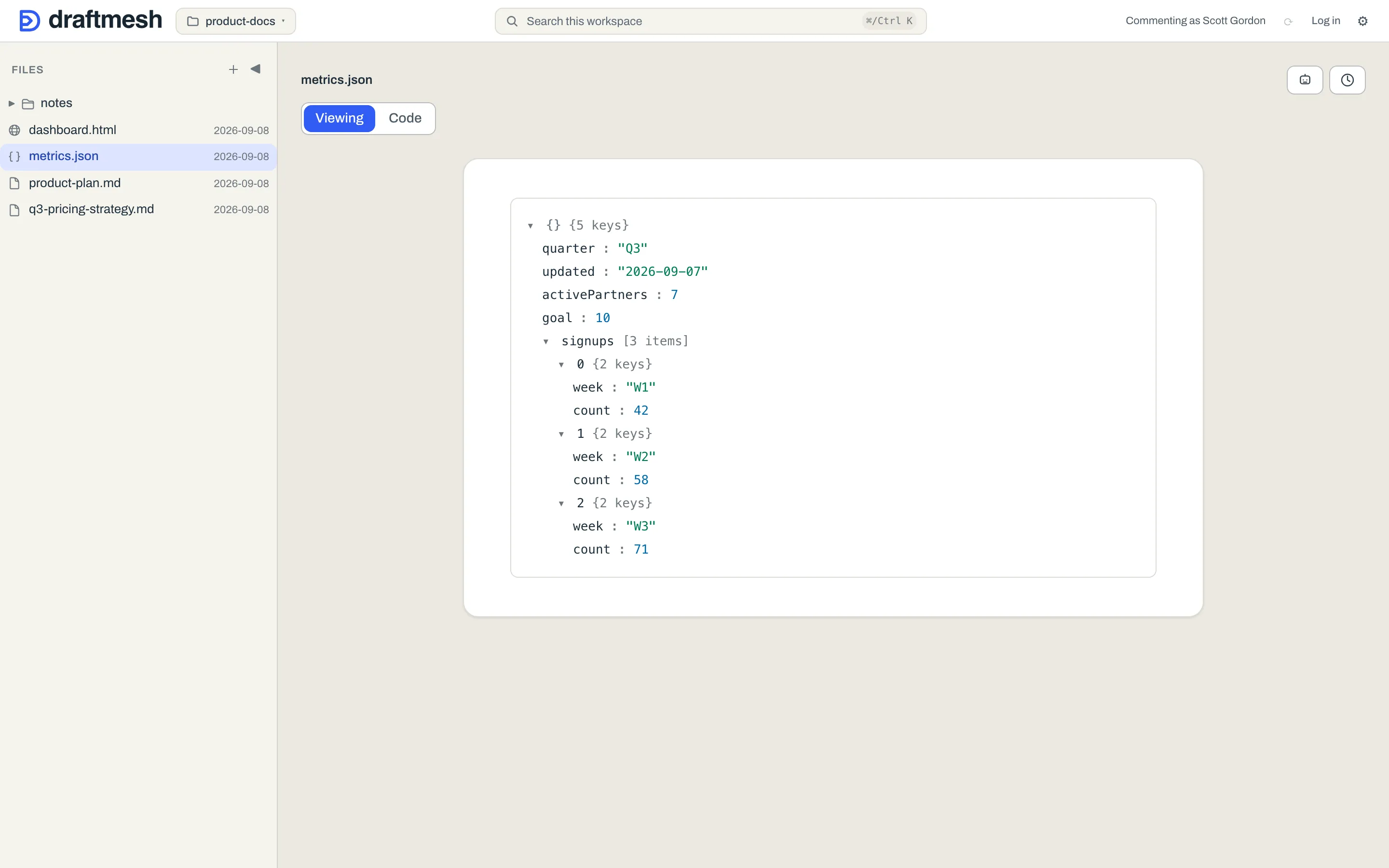
JSON files are data, not prose, so they deliberately carry no comments, suggestions, or approvals — but they are versioned like everything else, so history answers “who changed this number, and when”, and any version can be restored. DraftMesh refuses to save invalid JSON (from the editor or from an AI agent), so a typo can’t silently break the dashboards reading the file. A JSON file written invalid by an outside tool still opens — Code mode shows it with a notice so you can fix it.
Google reference files
A .gdoc, .gsheet or .gslides file — the small pointer file Google Drive for Desktop leaves on disk — is not the document. It is a few hundred bytes naming a file that lives in Google, so DraftMesh lists it, syncs it and versions it like any other file, and opens it to a card with the document’s title, its owner, and an Open in Google link. That link is the way to read or change the document; the truth stays in Google, and nothing DraftMesh shows is editable here. There are no comments, suggestions or approvals on a pointer.
Connect Google and the card shows more. With the connector attached, DraftMesh reads the file’s details from Drive and takes a snapshot of its contents, framed as “Snapshot as of …” — a Google Doc as read-only text, a Slides deck as its slides in order, a Google Sheet as a read-only grid with its tabs. The snapshot is also what makes the document findable: a phrase that appears only inside the Google document will match the reference in search, and an AI agent reading the file through DraftMesh sees the snapshot text as well as the pointer. Both of those start once DraftMesh has actually taken the snapshot, which it does in the background shortly after you open the reference in DraftMesh, or an AI agent reads it through DraftMesh — and takes again, the same way, the next time either happens after the document has changed in Google. A snapshot, once taken, is kept on this machine across DraftMesh restarts. Searching never waits on Google, so a reference nobody has opened or read yet still matches on its title, its owner and its link, and matches on its contents from then on. Snapshots are a cache held on the machine that took them — they never travel on the sync wire and never become a document of their own. A very large spreadsheet may be too big to snapshot; that card keeps its details and its link.
Sharing a reference shares the snapshot. The snapshot is read with the Google access of the account that connected Google to this DraftMesh — Google’s own sharing on the referenced document is never consulted for whoever reads it here. So the rule is that a grant on a reference is a grant on its snapshot: treat a .gdoc, .gsheet or .gslides reference as workspace content whose text is the Google document’s, and share it as you would share the Google document itself. Today the two halves live on different hosts. Google connects only to the DraftMesh on your own machine, which has no sharing door, so the snapshot there is seen by whatever reads through that DraftMesh — the reference’s card, search, and any AI agent connected to it. DraftMesh cloud has no Google connector, so a reference reached through a hosted account — by a person it is shared with, or an agent granted it — shows the reference’s own details and its link, and matches search on those, with no snapshot. Where a grant is made, the door says so: the Share panel and the Connect-an-agent dialog both carry this note on a reference. A snapshot is held only on the machine that took it.
Every part of this degrades quietly. No connector, a revoked token, a deleted Drive file, Google being down — the reference still lists, still opens, and still shows its title and link; the snapshot is simply absent, and search falls back to matching the pointer’s own text as it did before. The one case that asks something of you is a connection made before slide previews existed: its access doesn’t cover Slides, so the card offers Reconnect Google.
Office documents
A .docx, .xlsx or .pptx file is an opaque container, not text, so DraftMesh previews it rather than editing it: Viewing mode renders the document, and there are no comments, suggestions or approvals. They are versioned and synced like everything else, and their text is extracted for search, so a phrase inside a Word document or a deck finds the file.